
LLM’s are very useful in data analysis. In this blog I analyse a DTCC CFTC Swaps transaction file using Anthropic Claude to discover what insights I can get on the data.
Background
CFTC Public Price Dissemination files are published on the DTCC Dashboard. These contain transaction records for OTC Derivatives traded by US persons for products under CFTC jurisdiction e.g. Interest Rate Swaps. These records consist of a 100 or more columns with details on, the product, size, price and time of trades.
Let’s see what an LLM, in this case Claude, can do in helping us understand the data.
Starting Simple
DTCC publish intra-day slice files every few seconds or minutes, depending on activity levels and these files contain a small number of records. So I took one of these, selected at random, with just 3 rows of data, loaded the CSV file into the Claude UI and entered the following:
The attached file contains trade records, can you analyse the data and create a chart that shows me what is trading and in what volume?
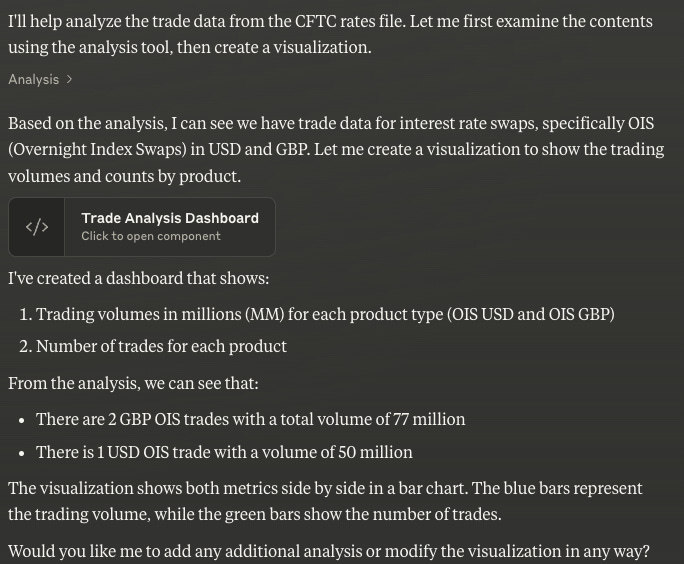
Which returned:

I could easily check by inspecting the CSV file that this was correct and clicking on the Trade Analysis Dashboard:

So far, so good, nicely done by the LLM.
A Whole Day of Trades
Next, I uploaded the cumulative CSV file of all Interest Rate transactions for February 14, 2025, which has > 20,000 transaction rows, is 12.2Mb in size and entered the following:
Create the same chart for the new attached file, but only include record rows where Event Type is set to TRAD
(Note: As there are transactions that Cancel and Correct rows as well as Terminations, I wanted to keep it simple and ignore this complexity).

I can quickly check in Excel that there are indeed 15,383 records of Event Type = ‘TRAD’, so that is good.
However the Dashboard produced looked odd with very large volumes and primarily JPY products, which I immediately realised was because the notionals in the file were in trade currency and I needed to ask for them to be converted.
please re-do this and convert all notional volume amounts to USD before showing in the chart
Claude found up to date FX rates and wrote the code to do the conversion.
I needed a further prompt to get rid of an odd looking result, possibly bad data.
Exclude from the chart any product with trade count less than 10


A nice looking chart.
And as I would expect the highest volume product is OIS USD with 3,666 trades and $540 billion, which I can confirm using Excel.
Trading Plaforms
Selecting just the product OIS USD, create a dashboard that shows the breakdown of volume by platform
And after a few more prompts, (four to be precise, including “I don’t like the pie chart”, “names not showing properly” and ‘“use only trade counts”), I got:

Which looks like what I would expect, given my prior knowledge about volumes on these trading platforms.
Price Evolution
Next, I wanted to get a sense of Swap prices, so entered:
Next I am interested in the evolution of price which for these USD OID products is in the column Fixed rate-Leg 1, using only those rows with an Expiration Date of 2030-02-19, create a dashboard that shows the evolution by timestamp during the day
Note the typo of “OID” instead of “OIS” and this is a good property of LLM that I want to point out, they cope with such typos very well.
After quite a few prompts, I managed to get a nice chart for 5Y OIS.

Showing where prices started the day and how they fell and then rose over the course of the day.
I did encounter problems with bad outliers, which I tried to remove in a number of ways, some of which relied on my knowledge of the data:
- remove outliers from the chart
- there are still some outliers shown by spikes from the prior, please remove these
- exclude any row with a non zero value in the column other payment amount
- also exclude any row that has Cleared = N
- get rid of the rows for times 16:22, 16:26, 16:27, 16:30
Still the effort was simple and worth it to get what I wanted. Next I entered:
Can you add a VWAP figure in the text above the chart calculated using the column notional amount-Leg 1
Impressively I did not need to enter Volume Weighted Average Price and Claude went away and updated the chart as requested, but the result it returned was the same as the low value of the range, so 4.023%, clearly not plausible.
On being told this was not correct and the low value, it re-did the calculations, returning a value close to the average, which seems correct (TBD).


Not bad at all. Let’s keep going.
can you update this dashboard with a visualisation that uses dots for the points highlights those points where the notional is greater than 100 million in a different color?
followed by:
I don’t like the scatter plot as we need to preserve time evolution on the x axis

This is slick and now getting well beyond my Excel skills.
Is it even possible to produce the above chart in Excel?
Probably, but with time-consuming work.
That is the beauty of LLMs being able to write code, in this case Javascript using React, to follow complex instructions and create charts and dashboards.
What Else?
Moving on, I tried the following:
reverting to looking all rows in the file, what other useful dashboard analysis can you create to analyse interesting aspects of the data

Nice ideas, the sorts of analysis that would indeed be interesting.
Impressive that it picked up on Term Structure and Package analysis, I had not expected it would do this, particularly packages.
However at the end of that box, I also got the dreaded “message limit reached.”

So two hours after starting my analysis, including writing the blog to this point, this seems a good cue to stop.
Switching to the simpler model or waiting 2.5 hours is not appealing!
I understand that due to current popularity, even paid customers get throttled.
Anyway, I have covered a fair amount of ground today, so time for some reflection.
Learnings
The CFTC public dissemination file contains Swap transaction records.
With minimal guidance, Claude was able to analyse the data and create nice dashboards.
Iterating with the output, I got a nice price evolution chart for USD OIS 5Y.
I did have to be critical in evaluating responses and ask for corrections.
Overall the effort was more than worth while.
Certainly easier than doing the same analysis in Excel.
Asking the LLM to suggest dashboards produced interesting insights.
What’s Next
That’s all for today.
I may follow up on some of these ideas in the next blog.
Or try another LLM.
Possibly one of the “reasoning/chain of thought” ones.
Which take more time and break complex requests into tasks.
Stay tuned for that.
Leave a Reply