
LLM’s are very useful in research and analysis. In this blog I use OpenAI ChatGPT to analyse DTCC CPMI-IOSCO QD documents to get an understanding of the benefits and pitfalls of using LLMs.
Background
Large Language Models (LLMs) are very useful in summarising and analysing data in documents. By using LLMs, we can improve our own productivity. Following on from my prior two blogs:
- Using an LLM with Public CPMI-IOSCO Quantitative Disclosures for CCPs, in which I used Anthropic Claude
- Trying another LLM with Public CPMI-IOSCO Quantitative Disclosures for CCPs, in which I used Google NotebookLM
In this weeks blog, I will use OpenAI ChatGPT for the same tasks.
CPMI-IOSCO Quantitative Disclosures (QDs)
On the Clarus Blog, I have written more than 25 articles on CCP Disclosures, one almost every quarter starting in 4Q 2016. This dataset is published quarterly by many Clearing Houses / Central Counterparties (CCPs) and contains over two hundred quantitative data fields covering margin, default resources, credit risk, collateral, liquidity risk, back-testing and more, with associated notes.
DTCC QDs for 3Q 2024
I will take the most recent DTCC QDs for Q3 2024 and compare these to the prior quarter’s publication. These are available in either xlsx or pdf form at the DTCC website. I downloaded the two recent pdfs and uploaded into OpenAI ChatGPT for which I subscribe to the paid ChatGPT Plus Subscription with access to 4.0.
Let’s get started with Initial Margin
I entered the following prompt:
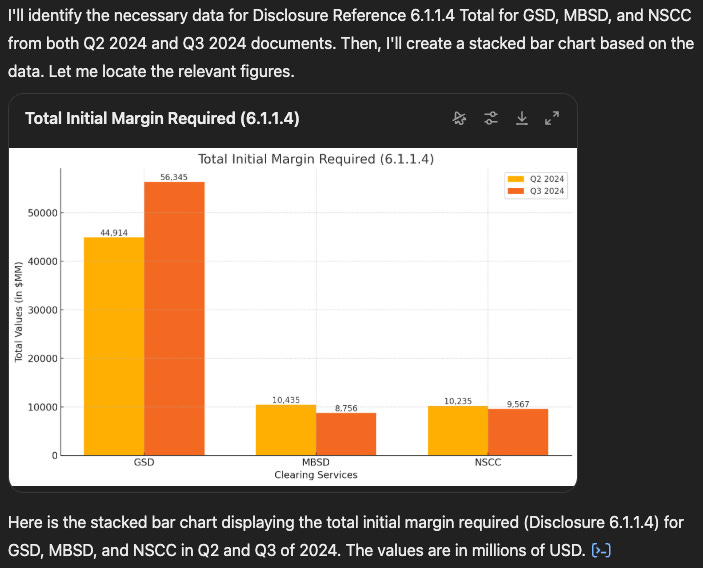
Create a stacked bar chart showing the values for disclosure reference 6.1.1.4 Total for each of GSD, MBSD and NSCC for both quarters for which their is data in the attached documents
ChatGPT then does it’s work, culminating in the below.

Nicely done, with figures for each of GSD, MBSD & NSCC for the two quarters.
However while it is a bar chart, it is not a stacked bar chart, which is what I asked for in the prompt and what I got back from Claude.
I am confident with one or two more prompts I could get that, but let’s move on.
What has increased the most?
For this question, after a few trials, I entered the following prompt:
In the most recent quarter find those disclosure references only for GSD that have increased the most from their value at the prior quarter end and show just the top 5 in a formatted table with rows ordered by highest percentage increase first
This returned the following table, which I output to CSV to display:

- Not the best formatting in the UI, but easily improved in Excel
- I could not get it to remove the first column, despite my attempts with a few longer prompt above, as don’t know what these number represent
- Unfortunately, again this table presents different results to my prior two blogs!
- Only one row in here was present in the results table produced by Claude (reference 4.3.7.1 with the same percentage increase) and none in the table from NotebookLM.
- Oh dear, I did not expect that.
Let’s try our “treat as new joiner” learning from the earlier blogs.
I do not think these are the disclosure references that have increased the most in percentage terms, please re-load and check the data from the tables in the sources documents and re-create the correct tables.

Showing a changed table, with another row, 4.1.4 that was present in both the Claude and NotebookLM results and with the same percentage increase.
We could dig deeper, but while the flesh is willing the spirit is weak….
Let me repeat the learning from the prior blog “Any ambiguity in the machine readability of data, such as that present in these DTCC pdf source documents, can throw out the analysis, making it very wrong.”
Excel Workbooks
Now while the pdf tables are human readable, we see from the prior section that they have issues in machine readability, so lets turn to the equivalent Excel workbooks provided by DTCC.
The good news is that ChatGPT is able to read the XLSX format (unlike Claude or NotebookLM).
The bad news is that these Excel Workbooks are complex with many different tab sheets with data represented in specific layouts, according to an industry template.
Unfortunately ChatGPT is not able to cope with this and while it attempts to answer the same Top 5 query, they results are far worse than from the pdf.
So while bespoke code can be written to correctly interpret and load the data from these XLSX workbooks, the LLM left to its own devices (so with minimal guidance) is not able to cope. It does have an attempt, as the response states below, however it does a worse job than from the pdf files.

More Quarters of Data
The only remaining task from my prior blogs was to upload more data files.
So after asking ChatGPT to “ignore all the prior files that I have loaded”, I was able to load 5 pdf files and get the correct response at the first attempt to my query:
What are the values for disclosure reference 4.1.4 for GSD, for all 5 quarters for which there is data in the attached documents, show the results in a visual table.
I won’t show the output here, but will note that it took 3 prompts to get the correct results from NoteBookLM, while Claude could not process more than two data files.
Learnings
My learnings from today and the two earlier blogs.
- We need to get into the habit of always asking LLMs to check their results.
- Treat them as “new joiners” until we become familiar with their work.
- Each of the LLMs and their UIs have specific behaviour that takes familiarisation
- If our tasks requires data analysis, we need to be confident the source data is uploaded correctly, as any mistakes in this step could result in critical, insidious, non-obvious errors in the analysis
- It is best to pre-process source data to get into a clear machine readable format before loading into the LLM UIs
It is easy to fall into the fallacy that you can throw any document at an LLM and blindly trust the response to your prompt.
We need to guard against that.
What’s Next
That’s all for today.
To check my assumption that parsing of the pdf files is indeed the cause of my issues, I will need to pre-process that data and create clean CSVs files from the Excel workbooks.
A task and topic for the next blog.
Stay tuned for that.
Leave a Reply